高度なカスタムオプション
このページは、ある程度 HTML/CSS/JSON の基礎を持つ上級ユーザー向けです。高度な設定はカスタマイズ性を大幅に高められますが、「一見正しいが機能しない」設定を書いてしまうこともあるため、編集前に必ずバックアップを取ることを推奨します。
ご利用前のご注意
- エントリーは 開発者設定 から。
- 編集前に User Config / User Rules をバックアップし、不正な書式による設定無効化を防いでください。
- 最終のビルトイン設定は「Click to expand the final config」をご参照ください(項目・デフォルト値・利用可能なサービス一覧)。
エントリーと優先順位
主なエントリー(開発者設定):
- Edit Full User Config:完全な設定(
rules・翻訳サービス・スタイルなどすべて含む)。 - Edit User Rules:
rules配列のみ編集(ここは配列のみ受け付け、{ "rules": [...] }にしないでください)。 - Injected CSS:全体 CSS の注入。
優先度(高→低):ヒットした rules > generalRule > ビルトインのデフォルト設定。
rule がヒットした場合、generalRule とマージされ、rule の項目が優先されます。
クイックスタート(よくあるニーズ)
1) サイト内の本文だけを翻訳
{
  "rules": [
    {
      "matches": ["example.com"],
      "selectors": ["article", ".post-content"],
      "excludeSelectors": ["nav", "footer", ".comment"]
    }
  ]
}
2) いつも翻訳 / 一切翻訳しない
{
  "translationUrlPattern": {
    "matches": ["stackoverflow.com"],
    "excludeMatches": ["www.google.com/mail/*"]
  }
}
3) サイトごとに異なる翻訳サービスを利用
{
  "translationService": "google",
  "translationServices": {
    "deepl": {
      "matches": ["sci-hub.se"]
    }
  }
}
4) サイトごとに訳文スタイルを分ける
{
  "translationTheme": "none",
  "translationThemePatterns": {
    "underline": {
      "matches": ["discord.com"]
    }
  }
}
5) 訳文で見た目が崩れる場合、スタイル修正
{
  "rules": [
    {
      "matches": ["youtube.com"],
      "globalStyles": {
        "#video-title": "max-height:unset;"
      }
    }
  ]
}
6) パネルに未設定の翻訳サービスを表示しない
{
  "showUnconfiguredTranslationServiceInPopup": false
}
ルールとマッチング
ルールのマージ
generalRule:全サイト共通ルールのベース。rules:サイトごとのルール(命中した場合は一番優先される)。
rules のキーは generalRule の多くのキーと互換性があります。
matches の一般的な形式
matches は文字列または配列で指定可:
- ドメイン名:
example.com - 完全な URL:
https://example.com/path/ - ワイルドカード:
https://*/*q=* - すべてに一致:
*/*://*/*://*/* - ローカルファイル:
file://*
注意:*.twitter.com はサブドメインのみ一致し、ルートドメイン twitter.com には一致しません。
selectors / excludeSelectors
selectors:一致した要素のみ翻訳(デフォルト翻訳範囲を覆う)。excludeSelectors:翻訳から除外する要素。
「デフォルト範囲に追加/削除」したい場合は、.add / .remove を優先してください(詳細は次節)。
継承と増分修正(.add / .remove)
配列やオブジェクトのフィールドで .add / .remove による増分変更をサポート。
デフォルトルールの上書きを避けるため、これらの利用が推奨です:
[
  {
    "id": "twitter",
    "selectors.add": ["[data-testid='tweetText'] a"],
    "excludeSelectors.add": ["header"]
  }
]
よく使うキー一覧(一部抜粋)
マッチング関連:
matches/excludeMatchesselectorMatches/excludeSelectorMatches
翻訳範囲:
selectors/excludeSelectors/excludeTagsstayOriginalSelectors/stayOriginalTagsextraInlineSelectors/extraBlockSelectors
スタイルとレイアウト:
translationClasses:訳文に追加クラス付与globalStyles/globalAttributesinjectedCss/additionalInjectedCsswrapperPrefix/wrapperSuffixblockMinTextCount/blockMinWordCount
タイミング・モバイル関連:
urlChangeDelay/observeUrlChangeisShowUserscriptPagePopup
GPT のようなストリーミングメッセージ翻訳
{
  "matches": ["chat.openai.com"],
  "excludeSelectors": [".markdown *"],
  "aiRule": {
    "streamingSelector": ".result-streaming.markdown",
    "messageWrapperSelector": ".markdown",
    "streamingChange": true
  }
}
詳細なフィールド説明は末尾「付録:Rule フィールドリファレンス」へ。
matches のマッチングロジック(簡略説明)
- 純粋なドメイン(
*やパス無し):hostname のみで比較。 - 完全な URL(
*無し):プロトコル+ホスト+ポート+パスで比較。 *含むまたはプロトコル省略:ワイルドカードロジックで比較(http/https/file をサポート)。
よくある例:
twitter.com✅https://twitter.com/homeに一致*.twitter.com✅https://mobile.twitter.comに一致、❌https://twitter.comには一致しないhttps://twitter.com/home:完全一致のみtwitter.com/*:twitter.com配下すべて
サイト適用例(Twitter の例)
以下はビルトインの Twitter ルール(一部抜粋)の例で、selectors / excludeSelectors / globalStyles の典型的な使い方を示します:
[
  {
    "id": "twitter",
    "matches": [
      "twitter.com",
      "mobile.twitter.com",
      "tweetdeck.twitter.com",
      "pro.twitter.com",
      "https://platform.twitter.com/embed*"
    ],
    "selectors": [
      "[data-testid=\"tweetText\"]",
      ".tweet-text",
      ".js-quoted-tweet-text",
      "[data-testid='card.layoutSmall.detail'] > div:nth-child(2)",
      "[data-testid='developerBuiltCardContainer'] > div:nth-child(2)",
      "[data-testid='card.layoutLarge.detail'] > div:nth-child(2)",
      "[data-testid='cellInnerDiv'] div[data-testid='UserCell'] > div> div:nth-child(2)",
      "[data-testid='UserDescription']",
      "[data-testid='HoverCard'] div[dir=auto]",
      "[data-testid='HoverCard'] span[dir=auto]",
      "[data-testid='HoverCard'] [role='dialog'] div[dir=ltr]",
      "[data-testid='birdwatch-pivot'] div[dir=ltr]"
    ],
    "excludeSelectors": [
      "[aria-describedby][role=button]",
      "header",
      "[data-testid='radioGroupplayback_rate'] div",
      "[data-testid='userFollowIndicator']",
      "[class='css-901oao r-14j79pv r-37j5jr r-n6v787 r-16dba41 r-1cwl3u0 r-bcqeeo r-qvutc0']",
      "[class='css-175oi2r r-1wbh5a2 r-dnmrzs']"
    ],
    "globalStyles": {
      "[data-testid='card.layoutLarge.detail'] > div:nth-child(2)": "-webkit-line-clamp: unset;",
      "[data-testid='card.layoutSmall.detail'] > div:nth-child(2)": "-webkit-line-clamp: unset;",
      "[data-testid='tweetText']": "-webkit-line-clamp: unset;"
    }
  }
]
selectors:投稿本文など主要コンテンツのみ翻訳。ニックネームやボタンは翻訳されません。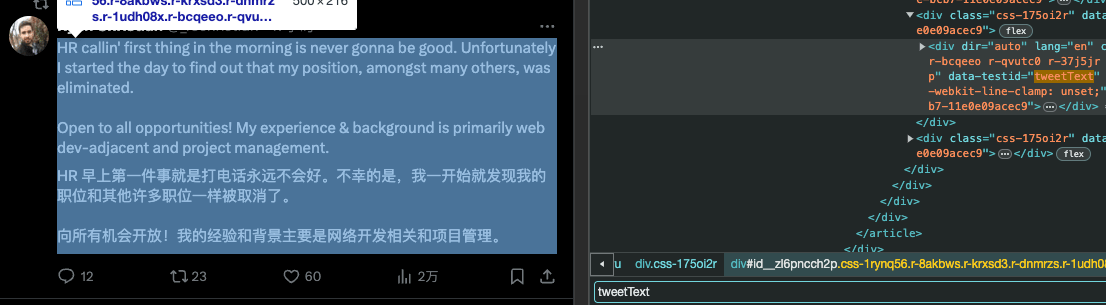
excludeSelectors:ボタンやナビゲーションなど操作部分を翻訳から除外。
globalStyles:元ページの行数制限を解除し、訳文の途切れを防ぎます。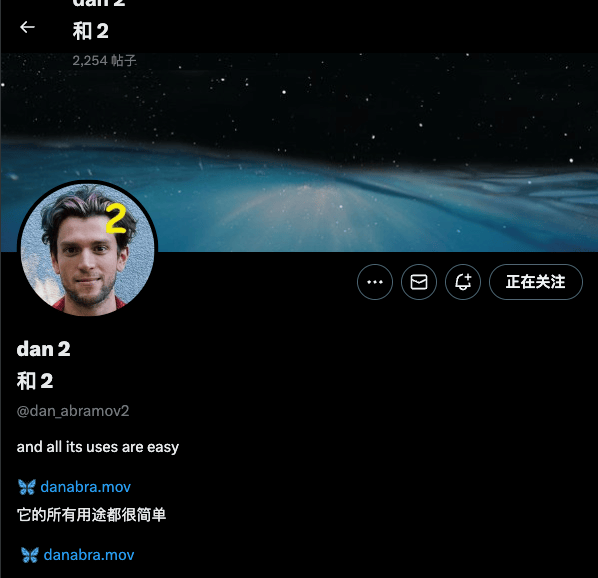
カスタムサイト適用
id でビルトインルールを継承し、.add/.remove で増分編集可能:
[
  {
    "id": "twitter",
    "selectors.remove": ["[data-testid=\"tweetText\"]"],
    "selectors.add": ["[data-testid=\"tweetText\"] a"],
    "excludeSelectors.add": ["header"],
    "excludeSelectors.remove": []
  }
]
解説:
idでビルトインルールを継承でき、matchesを繰り返し書く必要なし。.add/.removeで配列フィールドを増分編集できるため、推奨利用。
代表的なビルトイン id(一部):
isEbook:epub リーダーページisEbookBuilder:epub バイリンガル電子書籍生成ページpdf:PDF バイリンガル対訳ページ
全ビルトインルール例:
https://github.com/immersive-translate/next-immersive-translate/blob/main/docs/buildin_config.json
翻訳サービスの設定
translationService:デフォルトの翻訳エンジンtranslationServices:各サービスの設定やサイトごとの上書きshowUnconfiguredTranslationServiceInPopup:未設定サービスの非表示
例(テンセントの場合):
{
  "translationService": "tencent",
  "translationServices": {
    "tencent": {
      "secretId": "xxx",
      "secretKey": "xxx",
      "matches": ["twitter.com"],
      "limit": 3,
      "maxTextGroupLengthPerRequest": 25,
      "maxTextLengthPerRequest": 1800,
      "apiUrl": ""
    }
  }
}
解説:
matches:そのサービスを適用するサイトlimit:サービス制限(1 秒あたりのリクエスト数)maxTextGroupLengthPerRequest/maxTextLengthPerRequest:1 リクエストの最大文字・グループ数apiUrl:独自サービス URL の指定
リクエストタイムアウト設定
各サービスごとにリクエストタイムアウト (ms) を設定可。Pro サービスの場合 proRequestTimeout で個別指定可能。
{
  "translationServices": {
    "openai": {
      "requestTimeout": 60000
    },
    "gemini": {
      "proRequestTimeout": 90000
    }
  }
}
補足:
- タイムアウトが長すぎると待ち時間が増え、短すぎると失敗が増加します。
- デフォルトの値はサービス毎に異なるため、最終設定を参照してください。
proRequestTimeoutはproviderがproの場合(=有料翻訳サービスのみ)有効です。
言語と翻訳ポリシー
常に翻訳 / 翻訳しない対象言語
{
  "translationLanguagePattern": {
    "matches": ["en"],
    "excludeMatches": ["zh"]
  }
}
サイト指定ごとの元言語指定
{
  "sourceLanguageUrlPattern": {
    "en": {
      "matches": ["*.google.com"]
    }
  }
}
その他・高頻度グローバル設定
HTML タグのレンダリング許可
訳文内の HTML タグをレンダリングしたい場合は有効にしてください:
{
  "enableRenderHtmlTag": true
}
訳文のスタイル&テーマ
translationTheme のサポートスタイル(最終設定を参照):
none, grey, dashed, dashedBorder, solidBorder, dotted, underline, mask, opacity,
paper, dividingLine, highlight, marker, marker2, blockquote, weakening, italic,
bold, thinDashed, nativeDotted, wavy, nativeDashed, nativeUnderline, background
サイトごとのスタイル指定例:
{
  "translationThemePatterns": {
    "highlight": {
      "matches": ["discord.com"]
    }
  }
}
AI/高度なサービスパラメータ
temperature
{
  "translationServices": {
    "openai": {
      "temperature": 0.2
    }
  }
}
カスタムリクエストヘッダー/ボディ
{
  "translationServices": {
    "claude": {
      "headerConfigs": {
        "anthropic-version": "2023-06-01",
        "anthropic-dangerous-direct-browser-access": "true"
      },
      "bodyConfigs": {
        "max_tokens": 2048
      }
    }
  }
}
Gemini シリーズモデルのカスタマイズ
Gemini は内部にデフォルトがあるため、上書きには modelsOverrides 推奨:
{
  "translationServices": {
    "gemini": {
      "modelsOverrides": [
        {
          "models": ["gemini-2.5-flash", "gemini-2.5-flash-lite"],
          "bodyConfigs": {
            "temperature": 0.1
          }
        }
      ]
    }
  }
}
補足:modelsOverrides は他の AI サービスにも利用可能。モデル名が一致した時に設定を上書きします。
カスタムプロンプト厳格モード
大規模言語モデルの「幻覚」現象を抑えるため、プラグインには翻訳品質チェック機構を内蔵しています。レスポンスとリクエストのトークン数比率により妥当性を判別し、比率が正常値から大きく外れる場合は自動でバックアップ手段に切替えます。 カスタムプロンプトが翻訳以外(例:リライト・改良など)用途の場合、比率が標準から外れる場合があります。この時は厳格モードを ON にして比率チェックをスキップ可能です。
{
  "translationServices": {
    "claude": {
      "strictPrompt": true
    }
  }
}
多言語プロンプトのカスタム例(抜粋)
{
  "translationServices": {
    "openai": {
      "langOverrides": [
        {
          "id": "auto2ja",
          "systemPrompt": "あなたはプロの翻訳エンジンです。",
          "prompt": "次のテキストを{{to}}に翻訳してください:\n\n<text>\n{{text}}\n</text>",
          "multiplePrompt": "<yaml>\n{{yaml}}\n</yaml>",
          "subtitlePrompt": "<yaml_subtitles>\n{{yaml}}\n</yaml_subtitles>"
        }
      ]
    }
  }
}
用語集と機械翻訳
AI 用語集 機能は AI 翻訳サービスのみ使用可能です。
機械翻訳はデフォルトで用語集は無効です(機械翻訳だとプレースホルダ差し替えになり品質劣化が多いため)。強制有効化する場合(非推奨):
{
  "enableMachineTranslateTerms": true
}
キャッシュクリアの期間
拡張はデフォルトで翻訳キャッシュを 30 日ごとに自動クリアし、性能低下を防ぎます。
{
  "cacheMaxAgeDay": 30
}
Injected CSS と globalStyles
- Injected CSS:全ページに適用する CSS 注入。ページ全体のカスタム修正に適します。
- globalStyles:ルール単位のスタイル修正。サイトごとの修正用。
Injected CSS 例:
.immersive-translate-target-wrapper img {
  width: 16px;
  height: 16px;
}
トラブルシューティング・よくある落とし穴
*.twitter.comだけではルートドメインにマッチしません。必ずtwitter.comも指定してください。selectorsを使うとデフォルトの翻訳範囲を完全に上書きします。.add/.removeの利用を優先しましょう。matchesをexample.com/pathのように書くとワイルドカード適用になります。URL の一致範囲にご注意ください。- 設定が効かない時:最終設定画面で合成結果を確認し、ページをリロードしてください。
- JSON の末尾カンマはエラーのもとになります。
付録:Rule フィールドリファレンス
以下は Rule フィールドリファレンス(ドキュメント版)。よく使うフィールドを掲載しています。完全かつ最新の内容は最終設定を参照してください。
ヒント:配列やオブジェクトには .add / .remove で増分変更し、デフォルトルールを書き換えないよう推奨します。
export interface Rule {
  // サイトマッチング
  id?: string; // 内蔵ルール ID。ビルトインルール利用時に使用
  matches?: string | string[]; // このルールを適用するサイト
  excludeMatches?: string | string[]; // 除外するサイト
  selectorMatches?: string | string[]; // URL 指定せずセレクタでのマッチ
  excludeSelectorMatches?: string | string[]; // 上記の除外版

  // 翻訳対象範囲指定
  selectors?: string | string[]; // 翻訳する要素
  excludeSelectors?: string | string[]; // 除外要素
  excludeTags?: string | string[]; // 除外タグ

  // 翻訳範囲の追加(うまく行かない場合は selectors.add / selectors.remove を推奨)
  additionalSelectors?: string | string[]; // 範囲追加
  additionalExcludeSelectors?: string | string[]; // 除外追加
  additionalExcludeTags?: string | string[]; // 除外タグの追加(旧バージョンでのみ)

  // 元のまま残す
  stayOriginalSelectors?: string | string[]; // 指定要素は原文のまま
  stayOriginalTags?: string | string[]; // 指定タグ(例:code)は原文のまま

  // Block/Inline
  extraBlockSelectors?: string | string[]; // ブロック扱いにする要素
  extraInlineSelectors?: string | string[]; // インライン扱いにする要素
  inlineTags?: string | string[]; // インライン扱いにするタグ
  preWhitespaceDetectedTags?: string | string[]; // 自動改行するタグ

  // 訳文のクラス
  translationClasses?: string | string[]; // 訳文に追加クラス

  // 全体スタイル
  globalStyles?: Record<string, string>; // ページスタイル変更
  globalAttributes?: Record<string, Record<string, string | null>>; // 要素属性の操作

  // インジェクト CSS
  injectedCss?: string | string[]; // CSS 埋め込み
  additionalInjectedCss?: string | string[]; // CSS 追加

  // ラッパー
  wrapperPrefix?: string; // 訳文前プレフィックス
  wrapperSuffix?: string; // 訳文後サフィックス

  // ブロック分割
  blockMinTextCount?: number; // ブロック扱いする最小文字数
  blockMinWordCount?: number; // ブロック扱いする最小単語数

  // 翻訳対象の最小文字数
  containerMinTextCount?: number; // 自動認識時の最小文字数
  paragraphMinTextCount?: number; // 段落最小文字数
  paragraphMinWordCount?: number; // 段落最小単語数

  // 長文自動改行
  lineBreakMaxTextCount?: number; // 強制改行する最大文字数

  // 翻訳タイミング
  urlChangeDelay?: number; // ページ表示後の翻訳遅延
  observeUrlChange?: boolean; // URL 変化で再翻訳

  // モバイル
  isShowUserscriptPagePopup?: boolean; // モバイル用ページフロートの表示
  fingerCountToToggleTranslagePageWhenTouching?: number; // (廃止)

  // AI ストリーム翻訳
  aiRule?: {
    streamingSelector: string; // 翻訳中要素のセレクタ
    messageWrapperSelector: string; // メッセージ本体のセレクタ
    streamingChange: boolean; // 増分更新か
  };
}